
An x86 product built with Yocto has to produce more than a root file system: an EFI System Partition with the right boot loader, or none, microcode and ACPI archives for the initrd, a Unified Kernel Image, a disk layout and RAUC update bundles for A/B updates, and signatures for Secure Boot. This article goes through each of them, with the choices made on two industrial x86 products we built for customers.
We have described the x86 boot flow itself in a previous article, The x86 Boot Flow: the UEFI firmware and its variables, the ESP, microcode loading, ACPI tables and their overrides, the EFI stub, boot loaders and UKIs. This one builds on it, and links back to it rather than repeating it.
Contents
Two Products, Two Sets of Constraints
The choices described below come from two customer projects, which started from different needs.
The first is a family of x86 industrial PCs, panel and box models, installed on machines and in plants. Their maker wanted a single platform for several product lines, updated remotely across a fleet, and the security target was level 2 of IEC 62443: a boot chain verified from the firmware down to the root file system. The kernel runs with PREEMPT_RT, and the platform can also host virtual machines with KVM. We kept systemd-boot with a signed UKI, protected the root file system with dm-verity, used RAUC with a custom back end for A/B updates, and wrote a USB provisioning image that installs the system and enrolls the Secure Boot keys in one pass. The platform was built on Scarthgap and is moving to Wrynose; the last part of this article lists what that move changes for the boot chain.
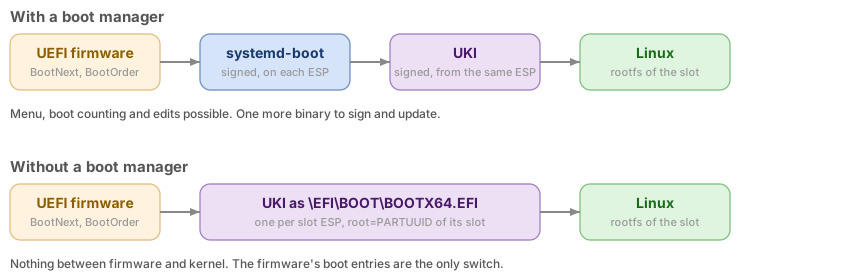
The second is a portable imaging instrument used for infrastructure inspection. Next to its x86 compute module, it carries cameras, an FPGA, an AI accelerator, and a microcontroller that drives part of the hardware. Nobody ever sees a boot menu on it. What mattered to the customer was that Linux and the microcontroller firmware always move to a new release together, and that a blank unit can be installed at the factory from a USB stick. The project was on Kirkstone. We removed the boot loader altogether: the firmware starts a UKI for each side, RAUC switches sides through the firmware’s boot entries, and the same bundle updates the microcontroller.
Choosing the Boot Loader
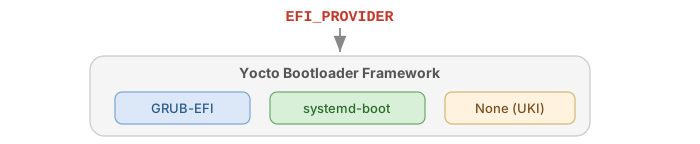
Yocto handles UEFI boot loaders through one variable, EFI_PROVIDER. Each provider comes with a class that installs the binary and one that generates its configuration, and wic writes the result to the ESP.
# Machine configuration
EFI_PROVIDER ?= "systemd-boot"   # or "grub-efi"

# No boot loader at all: the firmware starts a UKI directly
EFI_PROVIDER = ""

MACHINE_FEATURES += "efi"
We set it in the machine configuration of each product. The provider binary ends up as the default boot loader, /EFI/BOOT/BOOTX64.EFI, on the ESP. Leaving EFI_PROVIDER empty is a legitimate choice, covered below with A/B updates.
What goes on the ESP
IMAGE_EFI_BOOT_FILES lists the files copied from the deploy directory to the ESP, on top of the boot loader and its configuration:
# Copy as is
IMAGE_EFI_BOOT_FILES = "bzImage microcode.cpio"

# Copy under another name (semicolon)
IMAGE_EFI_BOOT_FILES = "bzImage;vmlinuz.efi"

# Copy a directory tree
IMAGE_EFI_BOOT_FILES = "EFI/vendor/*;EFI/vendor/"
The text after the semicolon is the destination on the ESP, so a file can be renamed, or a whole directory copied to a given place.
systemd-boot
systemd-boot.bbclass installs the binary and systemd-boot-cfg.bbclass writes loader.conf and one entry per label, in the format shown in the previous article:
SYSTEMD_BOOT_TIMEOUT = "1"

LABELS = "boot recovery"
APPEND:boot = "rootwait console=ttyS0,115200"
APPEND:recovery = "rootwait console=ttyS0,115200 systemd.unit=rescue.target"

# Or bring your own files
SYSTEMD_BOOT_CFG = "${WORKDIR}/loader.conf"
SYSTEMD_BOOT_ENTRIES = "${WORKDIR}/boot.conf ${WORKDIR}/recovery.conf"
Per-label settings use the override syntax, APPEND:boot; since Honister, APPEND_boot is no longer an override but a separate variable that the class never reads, so it is silently ignored.
GRUB
The GRUB classes generate grub.cfg from similar variables, one entry per label, and GRUB_BUILDIN chooses the modules built into the binary:
GRUB_TIMEOUT = "3"
GRUB_ROOT = "PARTUUID=4f9b6c1e-02"
GRUB_GFXSERIAL = "1"
LABELS = "boot recovery"
APPEND = "rootwait console=ttyS0,115200"

# Modules built into the GRUB image
GRUB_BUILDIN = "boot linux ext2 fat part_gpt normal efi_gop search configfile loadenv"
Yocto builds GRUB as a single image with the modules of GRUB_BUILDIN. GRUB could load more modules from the ESP, but with Secure Boot enabled it refuses to load any module from disk, so every module the configuration uses has to be in that list, including loadenv, which the boot counting described with GRUB’s configuration needs to read and write grubenv.
Microcode and ACPI Archives
The early archives that go in front of the initramfs come from two recipes. The microcode bundle is built by intel-microcode, in meta-intel, with iucode_tool:

# meta-intel: recipes-core/microcode/intel-microcode (main lines)
DEPENDS = "iucode-tool-native"

do_compile() {
    ${STAGING_DIR_NATIVE}${sbindir_native}/iucode_tool \
        ${UCODE_FILTER_PARAMETERS} --overwrite \
        --write-earlyfw=${WORKDIR}/microcode_${PV}.cpio \
        ${S}/intel-ucode/* ${S}/intel-ucode-with-caveats/*
}
UCODE_FILTER_PARAMETERS keeps only the processors of the product, which shrinks the archive. ACPI table overrides take a small recipe of their own, which compiles the ASL sources and packs the result in an uncompressed archive:
# recipes-bsp/acpi-override/acpi-override.bb
SUMMARY = "ACPI tables missing from the board firmware"
LICENSE = "MIT"
LIC_FILES_CHKSUM = "file://${COMMON_LICENSE_DIR}/MIT;md5=0835ade698e0bcf8506ecda2f7b4f302"

SRC_URI = "file://qspi-flash.asl"
DEPENDS = "acpica-native cpio-native"
inherit deploy

do_compile() {
    rm -rf kernel && install -d kernel/firmware/acpi
    for t in qspi-flash; do
        iasl -p kernel/firmware/acpi/$t ${UNPACKDIR}/$t.asl
    done
    find kernel | cpio -H newc --create > acpi_override.cpio   # not compressed
}

do_deploy() {
    install -m 0644 acpi_override.cpio ${DEPLOYDIR}/
}
addtask deploy after do_compile before do_build
Both archives then go in front of the initramfs, in that order:

wic takes them from there. Its EFI plugin accepts a list of files in initrd=, separated by semicolons: it copies each one to the ESP and lists them, in that order, in the boot loader entry. When it builds a UKI, they end up in its .initrd section instead.
Building the UKI
A Unified Kernel Image bundles the kernel, the initrd and the command line behind systemd-stub. Yocto can build one in three ways, depending on the release:
- The wic EFI plugin, from Kirkstone to Styhead (5.1):
create-unified-kernel-image=truein its source parameters builds the UKI while building the ESP, withinitrd=as its initrd and the command line of thebootloaderline. Walnascar (5.2) removed this option from the plugin. uki.bbclass, from Walnascar (5.2): a class for the image recipe, driven byUKI_CMDLINE,UKI_FILENAMEandINITRAMFS_IMAGE, with optional signing. It expects systemd-boot asEFI_PROVIDER, andefi-uki-bootdisk.wks.inshows the matching disk layout.- Your own task, when neither fits. The imaging instrument described below needed one UKI per A/B slot, each with its own
root=, on Kirkstone. Its image recipe runsobjcopyonlinuxx64.efi.stuband computes each section address from the stub’sSectionAlignmentand the end of its last section, asukifywould, rather than using fixed addresses.
The kernel must be built with CONFIG_EFI_STUB=y, which KERNEL_FEATURES += "cfg/efi.scc" brings with the Yocto kernel tools. With uki.bbclass, the image recipe looks like this:
# Walnascar (5.2) and later: in the image recipe
inherit uki

UKI_FILENAME = "linux.efi"
UKI_CMDLINE = "rootwait root=PARTUUID=${ROOTFS_PARTUUID} ro"
INITRAMFS_IMAGE = "core-image-minimal-initramfs"

# Optional signature, needs sbsigntool-native (meta-secure-core)
UKI_SB_KEY = "${TOPDIR}/keys/db.key"
UKI_SB_CERT = "${TOPDIR}/keys/db.crt"
The UKI lands in the deploy directory, and from there on the ESP, where systemd-boot finds it in /EFI/Linux/; the last two lines sign it, and under Secure Boot, systemd-boot must also be signed with a key whose certificate is in db.
The Disk Layout
wic writes the disk image, partition by partition, on a GPT partition table. For A/B updates, each slot gets its own ESP and its own root file system:
# ab-efi.wks.in
bootloader --ptable gpt --timeout 1 --append="rootwait"

part --source bootimg_efi --sourceparams="loader=systemd-boot,initrd=microcode.cpio;acpi_override.cpio" \
     --part-name efi-a --part-type C12A7328-F81F-11D2-BA4B-00A0C93EC93B --fixed-size 256M
part --source rootfs --fstype=ext4 --part-name rootfs-a \
     --part-type 4F68BCE3-E8CD-4DB1-96E7-FBCAF984B709 --fixed-size 4G
part --fstype=vfat --part-name efi-b --part-type C12A7328-F81F-11D2-BA4B-00A0C93EC93B --fixed-size 256M
part --fstype=ext4 --part-name rootfs-b --part-type 4F68BCE3-E8CD-4DB1-96E7-FBCAF984B709 --fixed-size 4G
part --fstype=ext4 --part-name data --label data --fixed-size 8G
--part-typesets the partition type GUID:C12A7328-F81F-11D2-BA4B-00A0C93EC93Bmarks an ESP,4F68BCE3-E8CD-4DB1-96E7-FBCAF984B709an x86-64 root partition from the Discoverable Partitions Specification. These GUIDs go in--part-type, not in--uuid, which sets the unique identifier of one partition: two partitions with the same UUID confuse every tool that looks them up.--part-namesets the GPT partition name, which gives stable/dev/disk/by-partlabel/paths for the update tool.- The plugin is spelled
bootimg-efiup to Walnascar andbootimg_efifrom Whinlatter (5.3) on; the last part shows the change on a real layer. It reads the boot loader fromloader=, which.wks.infiles often set to${EFI_PROVIDER}. - The second slot is created empty: the first update fills it.
A/B Updates on UEFI
With two slots, an update writes the inactive one while the system runs, then switches. The switch must be reversible: if the new system does not come up, the device has to boot the old one by itself. On UEFI, this is not something the firmware does on its own. As we saw with the firmware boot process, it moves to the next boot entry only when a binary cannot be loaded; a kernel that panics, or a service that never starts, never brings it back to the other slot.
The mechanism is BootNext: the update makes the new slot the next boot, once. If it comes up and user space checks it, it becomes the default in BootOrder. If it hangs, a watchdog or a power cycle reboots the device, BootNext is already consumed, and BootOrder still points to the old slot.
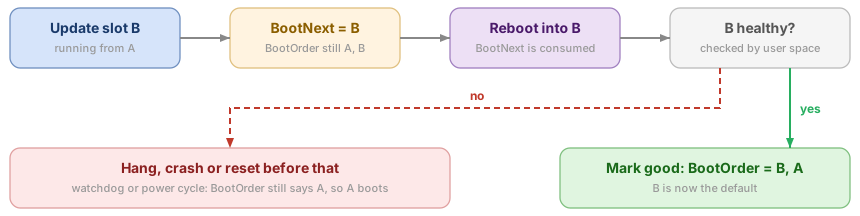
By hand, with the efibootmgr commands already met, a switch to slot B looks like this:
# After writing slot B
efibootmgr --bootnext 0003        # Boot0003 is slot B
reboot

# In slot B, once the application is up and healthy
efibootmgr --bootorder 0003,0000  # B first, A as fallback
Nothing marks the slot good unless something decides it is: the application, or a dedicated health check. A system that boots but cannot do its job should not become the default. An update client such as RAUC takes care of the writing, the switch and the bookkeeping, as the next section shows.
When the firmware does not follow the specification
This scheme relies on the firmware handling BootNext as the UEFI specification says, and not every firmware does. On one of the industrial PCs, with only two boot entries, the firmware deleted the Boot#### entry that BootNext pointed to whenever that entry was missing from BootOrder, instead of booting it, and booted the old slot. The workaround, run by the update after setting BootNext, is to append that entry to BootOrder, after the current one:
# BootOrder is 0000 (slot A), BootNext was just set to 0001 (slot B)
efibootmgr --bootorder 0000,0001
Since then, the switch is tested on each firmware version the product ships with: two boot entries, a BootNext, a reboot, then a power cut during the first boot of the new slot.
A/B Updates with RAUC
RAUC is an update client for embedded Linux. It installs signed update bundles into the inactive slot, and talks to the boot loader, or here the UEFI firmware, to switch slots and record which slot is good. Both products use it, with different choices at almost every step. Its configuration on the device is /etc/rauc/system.conf.
Slots and slot groups
The industrial PCs list two ESPs and two root partitions, and declares each ESP as the parent of a root partition:
# /etc/rauc/system.conf, industrial PCs
[system]
compatible=example-product
bootloader=custom
bootloader-custom-backend=/usr/lib/rauc/bootloader.sh
statusfile=/data/rauc/slot.raucs

[keyring]
path=/usr/lib/rauc/ca.cert.pem

[slot.efi.0]
device=/dev/disk/by-partlabel/efi0
type=vfat
bootname=system0

[slot.rootfs.0]
device=/dev/disk/by-partlabel/rootfs0
type=raw
parent=efi.0

[slot.efi.1]
device=/dev/disk/by-partlabel/efi1
type=vfat
bootname=system1

[slot.rootfs.1]
device=/dev/disk/by-partlabel/rootfs1
type=raw
parent=efi.1
The imaging instrument does the opposite: the root partition is the parent, and the ESP its child:
# /etc/rauc/system.conf, imaging instrument
[system]
compatible=example-device
bootloader=efi
data-directory=/data/rauc
variant-file=/run/rauc-variant

[keyring]
path=ca.cert.pem

[slot.rootfs.a]
device=/dev/disk/by-partlabel/rootfs-a
type=ext4
bootname=SystemA

[slot.esp.a]
device=/dev/disk/by-partlabel/boot-a
type=vfat
parent=rootfs.a

[slot.rootfs.b]
device=/dev/disk/by-partlabel/rootfs-b
type=ext4
bootname=SystemB

[slot.esp.b]
device=/dev/disk/by-partlabel/boot-b
type=vfat
parent=rootfs.b
A parent and its children form a slot group: RAUC always updates the group of the inactive side as a whole, so the ESP and the root file system of one side never come from two different releases. Only the parent carries a bootname, the name of the slot for the boot loader back end, and its state, good or bad, stands for the whole group. The choice of parent follows what the boot process selects first:
- ESP as parent, on the industrial PCs: the firmware boots systemd-boot from one ESP, which then starts the UKI of the same ESP. The ESP is what the firmware chooses, so it carries the
bootname, and the root partition follows it. - Root file system as parent, on the instrument: what defines a side is its root file system, which the UKI names with
root=PARTUUID=. The ESP is only the vehicle of that UKI, a child of the root partition it boots.
compatible must match the one written in each bundle, which keeps the bundle of one product off another. The keyring holds the certificate authority that bundle signatures must chain to.
Building bundles with Yocto
meta-rauc builds bundles from a recipe that inherits bundle. Each image of the bundle targets a slot class, and RAUC writes it to the slot of that class in the inactive group. This is the instrument’s bundle:
# recipes-core/bundles/product-bundle.bb
inherit bundle

RAUC_BUNDLE_COMPATIBLE = "example-device"
RAUC_BUNDLE_FORMAT = "verity"
RAUC_BUNDLE_SLOTS = "rootfs esp.a esp.b"

RAUC_SLOT_rootfs = "core-image-product"
RAUC_SLOT_rootfs[file] = "core-image-product-${MACHINE}.ext4"
RAUC_SLOT_rootfs[hooks] = "post-install"

# One ESP image per variant, see below
RAUC_SLOT_esp.a = "core-image-product"
RAUC_SLOT_esp.a[file] = "uki-b.vfat"
RAUC_SLOT_esp.b = "core-image-product"
RAUC_SLOT_esp.b[file] = "uki-a.vfat"

# Hook script, and a firmware image for a companion microcontroller
SRC_URI += "file://hook.sh"
RAUC_BUNDLE_HOOKS[file] = "hook.sh"
RAUC_BUNDLE_EXTRA_FILES += "mcu-firmware.bin"

RAUC_KEY_FILE = "${RAUC_KEYS_DIR}/development.key.pem"
RAUC_CERT_FILE = "${RAUC_KEYS_DIR}/development.cert.pem"
RAUC_BUNDLE_FORMAT = "verity"protects the bundle content with dm-verity, so that RAUC can mount it and stream from it, even over the network, without trusting anything it has not checked.RAUC_SLOT_rootfs[hooks] = "post-install"runs the hook once the root file system is written. Here it flashes the firmware of a microcontroller of the board, shipped in the bundle as an extra file, so that the whole device moves to the new release in one update.- The key and certificate are development ones. Production bundles are signed again on a signing machine, as described with release signing below.
One UKI per slot, with variants
The instrument has no boot loader, so each side’s UKI carries the root=PARTUUID= of its own side: the UKI for side A is not the one for side B. Yet a bundle is the same for every device, whichever side it runs on. RAUC variants solve this. esp.a and esp.b in the bundle are two variants of the esp image, and on the device, variant-file tells RAUC which variant applies.
The trick is in what the variant names. A small service, started before RAUC, writes the side the device is running on:
# rauc-variant.sh, run by a oneshot service ordered Before=rauc.service
rootdev=$(lsblk -o MOUNTPOINT,PATH | awk '$1 == "/" {print $2}')
if [ "$(readlink -f /dev/disk/by-partlabel/rootfs-a)" = "$rootdev" ]; then
    echo a > /run/rauc-variant
else
    echo b > /run/rauc-variant
fi
Running on side A, the update goes to side B, so variant a must carry the UKI that boots B: that is why the recipe above maps esp.a to uki-b.vfat, and esp.b to uki-a.vfat. The image build produces both UKIs, with its own task, and an ESP image for each.
Switching slots: the efi and custom back ends
RAUC switches slots through a boot loader back end. The instrument uses the built-in efi one: the bootname of each slot is the label of its firmware boot entry, created once at installation:
efibootmgr --create --disk /dev/nvme0n1 --part 1 --label SystemA --loader '\EFI\BOOT\BOOTX64.EFI'
efibootmgr --create --disk /dev/nvme0n1 --part 2 --label SystemB --loader '\EFI\BOOT\BOOTX64.EFI'
After an install, the efi back end makes the new slot boot next through BootNext; rauc status mark-good on that slot then makes it permanent in BootOrder.
The industrial PCs needed more control, to work around the firmware bug described above and to find the running slot from what systemd-boot reports. It uses a custom back end: a script that RAUC calls with one of five commands, and that implements them with efibootmgr:
# bootloader.sh <command> [args], called by RAUC
case "$1" in
get-primary)  ;;  # print the bootname that boots next: BootNext if set, else first in BootOrder
set-primary)  ;;  # $2 = bootname: set BootNext to its entry, create the entry if missing
get-state)    ;;  # $2 = bootname: print "good" or "bad" (entry active or not)
set-state)    ;;  # $2 = bootname, $3 = good|bad: activate or deactivate the entry
get-current)  ;;  # print the bootname of the running slot
esac
The script finds the disk that holds the ESPs from their partition labels. Its first version stripped the trailing digits from the partition device name, which works for /dev/sda1 but turns /dev/nvme0n1p1 into /dev/nvme0n1p. The fix asks sysfs for the parent device instead:
 create_efi_entries() {
-    TARGET_DISK=$(readlink -f /dev/disk/by-partlabel/efi0 | sed -E 's/(.*)[0-9]+$/\1/')
+    # Get parent disk via sysfs (e.g. /dev/sda1 -> /dev/sda, /dev/nvme0n1p1 -> /dev/nvme0n1)
+    _efi0_part=$(basename "$(readlink -f /dev/disk/by-partlabel/efi0)")
+    TARGET_DISK="/dev/$(basename "$(readlink -f "/sys/class/block/${_efi0_part}/..")")"
In sysfs, a partition is a child directory of its disk, so the parent link gives the disk name whatever the naming scheme of the driver. To answer get-current, it reads LoaderDevicePartUUID, a variable systemd-boot sets to the partition it was loaded from, finds that ESP, and derives the slot from it. systemd-boot’s own boot counting stays available on top.
Marking a slot good
The two products decide that a slot is good at different places.
- From the application, on the instrument: its start-up script prepares the system, mounts the application, and only then runs
rauc status mark-good, right before starting the main application. A side that cannot get that far never becomes the default. - From systemd, on the industrial PCs: systemd’s
boot-complete.targetis reached only once the units it requires, and that are ordered before it, have succeeded, and RAUC’srauc-mark-good.serviceruns after that target. Health checks become ordinary units ordered beforeboot-complete.targetand required by it, and a companion unit marks the slot bad when the target fails.
The systemd way keeps the decision out of the application, but requires the checks to be explicit. On the industrial PCs, the default target is a configuration target that starts every configuration unit, then switches to the runtime target; the boot only counts as complete once that configuration has run.
The two designs side by side
| Industrial PCs | Imaging instrument | |
|---|---|---|
| What the firmware starts | systemd-boot, then the UKI of the same ESP | the UKI of the slot, directly |
| Slot group parent | the ESP | the root file system |
| UKI per slot | one UKI, the same for both sides | one per side, chosen through RAUC variants |
| RAUC back end | custom, with efibootmgr | efi, built in |
| Marking good | boot-complete.target and rauc-mark-good.service | rauc status mark-good from the start-up script |
| Root file system | dm-verity, initramfs built into the kernel | read-only ext4, mounted by the kernel |
| Files to sign for Secure Boot | systemd-boot and the UKI | the UKI |
Going without a boot loader removes a component to build, sign and update, but leaves you with the firmware’s handling of boot entries, which varies between vendors. The design then depends on BootNext and the entry order surviving a firmware update or a reset of the firmware settings.
Secure Boot
Secure Boot makes the firmware run only EFI binaries it trusts. It is what makes the ESP, a FAT partition with no permissions, safe: anything that can write to it can replace a boot binary, but the firmware refuses to run a binary whose signature it does not trust. With a UKI, the signature also covers the initrd and the command line; with a read-only, verified root file system behind it, the chain of trust reaches the whole system.
Keys and databases
The firmware keeps its trust anchors in four UEFI variables, : PK guards itself and KEK, and KEK guards both db and dbx:
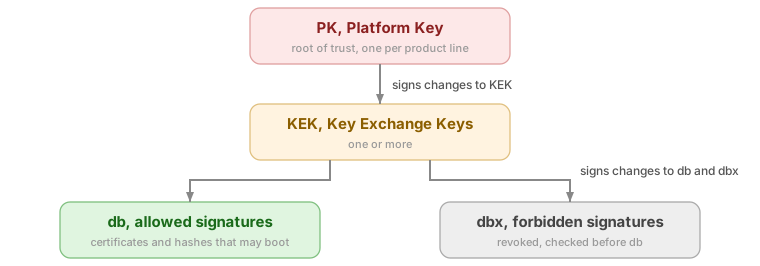
- PK, the Platform Key: one, owned by the device maker, the actual root of trust. It authorizes changes to the KEK. On the industrial PCs, one PK covers the whole fleet.
- KEK, Key Exchange Keys: they authorize changes to db and dbx.
- db: the certificates and hashes allowed to boot. Your signing certificate goes here.
- dbx: revoked certificates and hashes.
How the firmware decides
With Secure Boot enabled, the firmware checks every EFI binary it is about to start, in this order:
- If the binary’s hash, or any certificate it is signed with, is in dbx, it is refused.
- Otherwise, if its hash is in db, or one of its signatures chains to a certificate in db, it runs.
- Otherwise, it is refused.
A binary can carry several signatures, and one valid signature is enough. That is convenient for releases: a binary signed at build time with a development key can be signed again with the production key, and boots on both kinds of devices. Since development keys are never enrolled on production devices, the extra signature weakens nothing; sbattach --remove strips signatures when you prefer clean binaries.
Setup mode and user mode
Without a PK, the firmware is in setup mode: it accepts unsigned writes to the key databases and boots anything. Enrolling a PK switches it to user mode, where every key change must be signed by the key above, and every boot binary is verified as long as the Secure Boot option is enabled in the firmware setup. Linux shows the state in two variables:
# 1 = setup mode, 0 = user mode (last byte, after the 4-byte attributes)
od -An -t u1 /sys/firmware/efi/efivars/SetupMode-8be4df61-93ca-11d2-aa0d-00e098032b8c
mokutil --sb-state
mokutil prints whether Secure Boot is enabled, and adds that the platform is in setup mode when the firmware has no PK yet.
Creating the keys
The keys are ordinary X.509 certificates. efitools converts each one into an EFI signature list (.esl), then signs it with the key above into an authenticated update (.auth), the format the firmware and the enrollment tools accept. The PK signs itself and the KEK, and the KEK signs db:
uuidgen --random > GUID.txt            # owner of the entries

for k in PK KEK db; do
    openssl req -new -x509 -newkey rsa:2048 -sha256 -days 3650 -nodes \
        -subj "/CN=Example $k/" -keyout $k.key -out $k.crt
    openssl x509 -outform DER -in $k.crt -out $k.cer      # for firmware menus
    cert-to-efi-sig-list -g "$(cat GUID.txt)" $k.crt $k.esl
done

sign-efi-sig-list -g "$(cat GUID.txt)" -k PK.key  -c PK.crt  PK  PK.esl  PK.auth
sign-efi-sig-list -g "$(cat GUID.txt)" -k PK.key  -c PK.crt  KEK KEK.esl KEK.auth
sign-efi-sig-list -g "$(cat GUID.txt)" -k KEK.key -c KEK.crt db  db.esl  db.auth
RSA-2048 is the safe choice: the UEFI specification only requires firmware to support RSA-2048, and some firmware implementations reject larger keys in KEK and db, sometimes without a clear error. The PK and KEK private keys are only needed to change the key databases, not to sign releases, so they can stay offline.
Preparing the firmware
A new board comes with the board maker’s PK and Microsoft’s certificates in KEK and db, and often with Secure Boot disabled. Before enrolling your own keys, the firmware has to be put in setup mode from its setup screen. On the AMI Aptio firmware of the industrial PCs, the steps are these; other vendors use similar menus under other names:
- Enter the firmware setup at power-on, with Esc or Del, and the setup password if one is set.
- In Security, Secure Boot, set Secure Boot Mode to Custom, which unlocks key management.
- In Key Management, delete all keys. Without a PK, the firmware is now in setup mode.
- Disable Factory Key Provision. Otherwise, the firmware puts its default keys back after a reset, and your PK is gone.
- Enable Secure Boot, save and reboot. In setup mode, the firmware still boots unsigned binaries, so the next step can run.
Enrolling the keys
There are three ways to enroll the keys, and the firmware leaves setup mode as soon as the PK is in. db and KEK go first, and the PK last.
From the firmware setup. The same Key Management menu offers, for each of PK, KEK, db and dbx, to set or append a key from a file on a USB stick. Firmware menus take .auth, .esl or DER .cer files, depending on the vendor. This is fine for a few development boards.
From Linux, in setup mode. This is what a provisioning image does on a production line: the device boots a dedicated image from USB, which installs the system and enrolls the keys in one pass. sbkeysync, from sbsigntool, enrolls a whole directory of .auth files laid out by variable. Linux protects the variables from accidental writes with the immutable attribute, which has to be cleared first:
# keys/PK/PK.auth, keys/KEK/KEK.auth, keys/db/db.auth (and keys/dbx/ if any)
chattr -i /sys/firmware/efi/efivars/PK-* /sys/firmware/efi/efivars/KEK-* \
          /sys/firmware/efi/efivars/db-* 2>/dev/null
sbkeysync --pk --verbose --keystore /media/usb/keys

# Or one variable at a time, with efitools
efi-updatevar -f db.auth  db
efi-updatevar -f KEK.auth KEK
efi-updatevar -f PK.auth  PK            # leaves setup mode
From the EFI shell, with KeyTool.efi from efitools, when no Linux system is at hand.
On the next boot, check that the firmware is in user mode and that the binaries still start. A binary that is not signed with a key whose certificate is in db now stops the boot, which is why the binaries are signed before the keys are enrolled.
Signing the binaries
sbsign adds an Authenticode signature to a PE/COFF binary, and sbverify checks it against a certificate:
sbsign --key db.key --cert db.crt --output BOOTX64.EFI systemd-bootx64.efi
sbsign --key db.key --cert db.crt --output linux.efi   linux-unsigned.efi
sbverify --cert db.crt linux.efi
sbverify --list linux.efi               # all signatures present
Everything the firmware starts must be signed with a key in db: the boot loader and the UKI, or the UKI alone when there is no boot loader. Binaries started by a boot loader must be verified too: systemd-boot starts the UKI through the firmware’s LoadImage service, and the firmware applies the same db and dbx checks to it, so the UKI must be signed as well. Microsoft-signed shim and Machine Owner Keys exist for distributions that must boot on PCs with Microsoft’s keys; an embedded product that enrolls its own keys does not need them.
Signing in Yocto, and for releases
With uki.bbclass, UKI_SB_KEY and UKI_SB_CERT sign the UKI, and systemd-boot has to be signed with a key that db also trusts. Without uki.bbclass, a task of the image recipe can do the job, as on the industrial PCs, where the image recipe signs systemd-boot before wic runs, and up to Scarthgap our own wic plugin, derived from the EFI plugin, signed the UKI that the EFI plugin built:
DEPENDS += "sbsigntool-native"

do_sign_efi() {
    sbsign --key ${SB_KEY_DIR}/db.key --cert ${SB_KEY_DIR}/db.crt \
        --output ${DEPLOY_DIR_IMAGE}/systemd-bootx64.efi \
        ${DEPLOY_DIR_IMAGE}/systemd-bootx64.efi
}
addtask sign_efi after do_image before do_image_wic
Those keys are development keys, and they can live in the layer. Production keys must not reach the build machines. On that product, release signing happens later, on a separate signing machine: it unpacks the RAUC update bundle, signs the EFI binaries of the boot partition image with the production db key, puts them back, and signs the bundle again with the update key:
unsquashfs product-image.raucb                      # bundle content in squashfs-root/
mcopy -i squashfs-root/boot.vfat ::/EFI/BOOT/bootx64.efi ./
mcopy -i squashfs-root/boot.vfat ::/EFI/Linux/linux.efi ./

sbsign --key db.key --cert db.crt --output bootx64.efi bootx64.efi
sbsign --key db.key --cert db.crt --output linux.efi linux.efi

mcopy -D overwrite -i squashfs-root/boot.vfat ./bootx64.efi ::/EFI/BOOT/bootx64.efi
mcopy -D overwrite -i squashfs-root/boot.vfat ./linux.efi   ::/EFI/Linux/linux.efi
rauc bundle --key bundle.key --cert bundle.crt --keyring ca.crt squashfs-root signed.raucb
sbsigntool-native comes from meta-secure-core, or is easy to carry in your own layer.
What Secure Boot does not cover
Secure Boot protects against software that tries to replace the boot chain. It does not protect against someone with the device in hand: with the firmware setup password, or by clearing the firmware settings on the board, an attacker can delete the keys or disable Secure Boot, and boot anything. On the industrial PCs, this is why the design reaches IEC 62443 security level 2 only with a firmware setup password, booting from removable media disabled after provisioning, and a sealed enclosure; measured boot is the next step, so that a modified boot chain at least loses access to the device’s secrets. Whether a firmware update keeps the enrolled keys also depends on the vendor’s update tool, as some reset them along with the other settings.
Measured boot and the TPM
Secure Boot decides what may run. A TPM records what did run: each stage measures the next one into the TPM’s Platform Configuration Registers, and secrets can be sealed so that only a given boot chain can unseal them, such as a disk encryption key.

# Unlock a LUKS volume with the TPM when Secure Boot state matches
systemd-cryptenroll /dev/nvme0n1p6 --tpm2-device=auto --tpm2-pcrs=7

# Yocto: TPM support (meta-security, meta-tpm layer)
DISTRO_FEATURES:append = " tpm2"
MACHINE_FEATURES:append = " tpm2"
IMAGE_INSTALL:append = " tpm2-tools"
KERNEL_FEATURES:append = " features/tpm/tpm.scc"
PCR 7, which reflects the Secure Boot state and keys, is a better anchor than PCR 0, which changes with every firmware update and would lock the data away after the first BIOS update. For the kernel and initrd, systemd-stub measures the UKI into PCR 11; when the secret is enrolled against a signed PCR policy, prepared at build time with systemd-measure and embedded in the UKI, new signed UKIs unseal it without re-enrolling.
From Scarthgap to Wrynose
Most of the recipes above work unchanged from one Yocto release to the next. The boot chain is where the releases since Scarthgap moved the most, and porting the industrial PCs to Wrynose (6.0) showed it. These are the changes in oe-core that touched it:
| Release | Change | Effect on the boot chain |
|---|---|---|
| Styhead (5.1) | sources unpack into UNPACKDIR, a subdirectory of WORKDIR | recipes refer to ${UNPACKDIR}; on Scarthgap, our layer defined it as WORKDIR to share recipes between releases |
| Walnascar (5.2) | UKI support moves from the wic EFI plugin to uki.bbclass | create-unified-kernel-image=true no longer exists |
| Whinlatter (5.3) | wic plugins renamed to importable Python names | bootimg-efi becomes bootimg_efi |
| Whinlatter (5.3) | S defaults to ${UNPACKDIR}/${BP} | S = "${WORKDIR}/git" goes away |
| Wrynose (6.0) | wic leaves oe-core for its own repository | wic is built by its own recipe |
On our layer, the disk layout changed on its first line. The plugin is ours, derived from the EFI plugin, so it follows the rename, and the UKI option goes away:
-part --source bootimg-efi-board --fixed-size 1G --sourceparams="loader=systemd-boot,create-unified-kernel-image=true,initrd=${INITRAMFS_IMAGE}-${MACHINE}.${INITRAMFS_FSTYPES}" --part-name "efi0" --label "efi0" --use-uuid --part-type "C12A7328-F81F-11D2-BA4B-00A0C93EC93B"
+part --source bootimg_efi_board --fixed-size 1G --sourceparams="loader=systemd-boot,initrd=${INITRAMFS_IMAGE}-${MACHINE}.${INITRAMFS_FSTYPES}" --part-name "efi0" --label "efi0" --use-uuid --part-type "C12A7328-F81F-11D2-BA4B-00A0C93EC93B"
The plugin subclasses the EFI plugin of oe-core and loads it by name, which has to follow the new module name as well:
-bootimgefi = importlib.import_module("bootimg-efi")
+bootimgefi = importlib.import_module("bootimg_efi")

 class BootimgEFIBoardPlugin(bootimgefi.BootimgEFIPlugin):
-    name = 'bootimg-efi-board'
+    name = 'bootimg_efi_board'
Up to Scarthgap, the same plugin also signed the UKI that the EFI plugin had just built, in do_post_partition(), and copied the signed file back into the ESP image. On Wrynose, the EFI plugin builds no UKI anymore, so that step had nothing left to sign and was removed. The UKI now has to come from the image recipe, with uki.bbclass, and its signature from UKI_SB_KEY and UKI_SB_CERT. The release signing described above does not change, since it works on the ESP image of the bundle, whatever built it.
The remaining changes were mechanical. Recipes that set S = "${WORKDIR}/git" drop the line, and a second git source unpacked inside the first one has to name its destination from UNPACKDIR:
-    git://github.com/rustyrussell/ccan.git;protocol=https;destsuffix=git/lib/ccan.git;name=ccan;branch=master \
+    git://github.com/rustyrussell/ccan.git;protocol=https;destsuffix=${UNPACKDIR}/${BP}/lib/ccan.git;name=ccan;branch=master \
This is the sbsigntool recipe, which the layer carries to sign EFI binaries. Recipes that install files from SRC_URI with file:// also read them from ${UNPACKDIR}, which our recipes already did on Scarthgap through that definition.
Summing Up
On x86, Yocto can produce the whole boot chain: the boot loader or none, the early archives, a signed UKI, and a disk ready for A/B updates. The parts that do not come for free are the policy ones: which slot is good, when to switch, and who holds the keys. Both products above rely on BootNext, RAUC slot groups and an explicit “mark good” from user space, and both sign everything the firmware runs.
LABCSMART designs and maintains boot chains, update systems and Secure Boot setups on industrial x86 and Arm products: see our engineering services. Yocto is also covered, hands-on, in our training.